


TL;DR: Grip AI is my open-source, self-hostable AI agent platform written in Python. The latest PyPI release is grip-ai 1.5.3. It supports Python 3.12+, Claude Agent SDK as the primary engine, LiteLLM fallback for non-Claude models, 15 LLM providers, 31 built-in tools, Telegram/Discord/Slack channels, 28 FastAPI endpoints, memory, cron jobs, MCP support, and workflow orchestration.
I built Grip AI because I wanted an AI agent that I could actually control.
Not another locked cloud chatbot. Not another wrapper that only works with one model. Not another project where I need five services, three dashboards, and a weekend just to make the agent read a file or run a command.
I wanted one local-first Python tool that could talk to different LLM providers, use real tools, run from my terminal, connect to chat apps, expose an API, and still give me enough safety controls to not feel stupid running it on my own machine.
That became Grip AI.
The project is live on PyPI and GitHub, and this post is my practical walkthrough of what it is, why I built it, how to install it, and where I think it fits.
My view: Grip AI is not trying to be a shiny AI demo. It is a developer tool for people who want a self-hosted AI agent they can inspect, run, extend, and connect to their own workflow.
What is Grip AI?
Short answer: Grip AI is a Python-based AI agent platform that runs on your own machine or server.
It can work like a terminal agent, a chat bot, a REST API, a scheduled automation runner, or a multi-agent workflow system depending on how you start it.
The core idea is simple:
- You choose your LLM provider.
- You give Grip a workspace.
- You enable the tools and channels you need.
- You run it locally, through the terminal, via API, or through Telegram/Discord/Slack.
Under the hood, Grip uses a dual-engine approach. Claude models can use the Claude Agent SDK path, while non-Claude models can run through LiteLLM with Grip’s own agent loop.
That matters because I do not want the entire project locked to one model vendor. Sometimes I want Claude for coding. Sometimes I want Gemini or Groq for fast cheaper work. Sometimes I want Ollama or LM Studio for local experiments. Grip is built around that flexibility.
Current public project stats from the project pages:
| Metric | Current number |
|---|---|
| Latest PyPI version | 1.5.3, released March 24, 2026 |
| Python requirement | Python 3.12+ |
| Python modules | 120+ |
| Lines of code | ~24,000 |
| Tests | 826 |
| Built-in tools | 31 tools |
| Built-in skills | 15 |
| LLM providers | 15 |
| REST API endpoints | 28 |
| License | MIT |
I am sharing these numbers because the older version of this article had stale stats. The project moved fast after launch, so the current numbers are higher now.
Why I built it
Short answer: I was tired of switching between disconnected AI tools.
The AI tooling space is powerful, but it can also feel messy if you are a developer who wants control. You have ChatGPT, Claude, Gemini, DeepSeek, Groq, OpenRouter, local Ollama models, and many more options. Each one has a different API, pricing model, limits, strengths, and dashboard.
That is fine for normal chat. It becomes painful when you want an agent that can actually do work.
I wanted one place where I could:
- Switch providers without rebuilding the whole workflow.
- Run the agent on my own machine or VPS.
- Let the agent read and write files inside a controlled workspace.
- Run shell commands with safety checks.
- Search the web, research pages, and convert documents.
- Talk to the same agent from Telegram, Discord, or Slack.
- Expose the agent through a REST API for other apps.
- Schedule recurring jobs without writing a separate cron wrapper every time.
Grip AI is my answer to that list.
It is still a developer tool. You should be comfortable with terminals, API keys, Python, and self-hosting basics. But that is also the point. If you want a polished consumer assistant, this may not be for you. If you want an agent framework you can own and modify, Grip is worth trying.
What Grip AI can do
Short answer: Grip can chat, use tools, run workflows, expose an API, connect to messaging apps, and keep task/memory context across sessions.
Here are the parts that matter most.
1. Dual engine support
Grip has two engine modes:
- Claude Agent SDK engine – best when you are using Claude models and want the native agentic loop.
- LiteLLM engine – useful for OpenAI, DeepSeek, Groq, Gemini, Ollama, LM Studio, OpenRouter, and other OpenAI-compatible providers.
The onboarding wizard helps set the right engine based on your provider choice, so you do not need to remember every config key on day one.
2. 15 LLM providers

Grip supports 15 providers according to the current project README. The list includes Anthropic, OpenRouter, OpenAI, DeepSeek, Groq, Google Gemini, Qwen, MiniMax, Moonshot/Kimi, Ollama Cloud, Ollama Local, vLLM, Llama.cpp, LM Studio, and OpenAI-compatible APIs.
This is one of the main reasons I built it. I do not want every workflow tied to one model. For example, I may use Claude for code-heavy tasks, a faster model for simple summaries, and a local model for private drafts.
3. 31 built-in tools
The tools are where Grip starts feeling like an actual agent instead of a chat window.
Current tool areas include:
- Filesystem tools – read, write, edit, append, list, delete, or trash files.
- Shell tools – execute terminal commands with deny-list checks.
- Web tools – web search and web fetch with HTML to markdown conversion.
- Browser automation – Playwright powered navigation, click, fill, screenshot, JS evaluation, and content extraction.
- Research tools – deeper web research workflows.
- Document conversion – PDF, DOCX, PPTX, XLSX, HTML, and image conversion through MarkItDown extras.
- Task tracking – persistent todo tools that help the agent stay oriented across iterations.
- Finance tools – stock quotes, history, and company info through yfinance.
- Messaging tools – send messages and files through configured channels.
- Workflow tools – multi-agent DAG execution.
- Scheduler tools – cron-style jobs and natural language scheduling.
That sounds like a lot because it is. But the point is not to use every tool on day one. The point is to have a useful agent foundation that can grow with your workflow.
4. Chat channels
Grip can run through Telegram, Discord, and Slack.
I like Telegram for personal workflows because it lets me message the agent from my phone. I can ask for quick research, send notes, or trigger tasks without opening a terminal.
For teams, Discord and Slack are more natural. The current project also supports attachments and auto-conversion features depending on the channel and extras installed.
5. REST API
Grip ships with a FastAPI server and 28 endpoints. That means you can use it as an agent backend for your own tools, internal dashboards, or small automations.
Example use cases:
- Send a prompt from your own app.
- List available tools.
- Run a health check.
- Convert documents to markdown.
- Manage sessions, memory, cron, skills, MCP, and workflows.
This is one of the reasons Grip is useful beyond personal chat. You can make it part of a larger system instead of treating it as a standalone toy.
How to install Grip AI
Short answer: install it from PyPI, then run the onboarding wizard.
You need Python 3.12 or newer. I prefer uv, but pip also works.
Install from PyPI
# Using uv
uv tool install grip-ai

# Using pip
pip install grip-ai
Install from source
git clone https://github.com/5unnykum4r/grip-ai.git
cd grip-ai
uv sync
If you want optional features, install the extras you need:
uv sync --extra discord
uv sync --extra slack
uv sync --extra mcp
uv sync --extra document
uv sync --extra browser
uv sync --extra observe
uv sync --extra all
I would start small. Install the core package, complete onboarding, run a few normal tasks, then add extras when you know what you actually need.
Setup walkthrough
Short answer: run grip onboard and follow the wizard.
grip onboard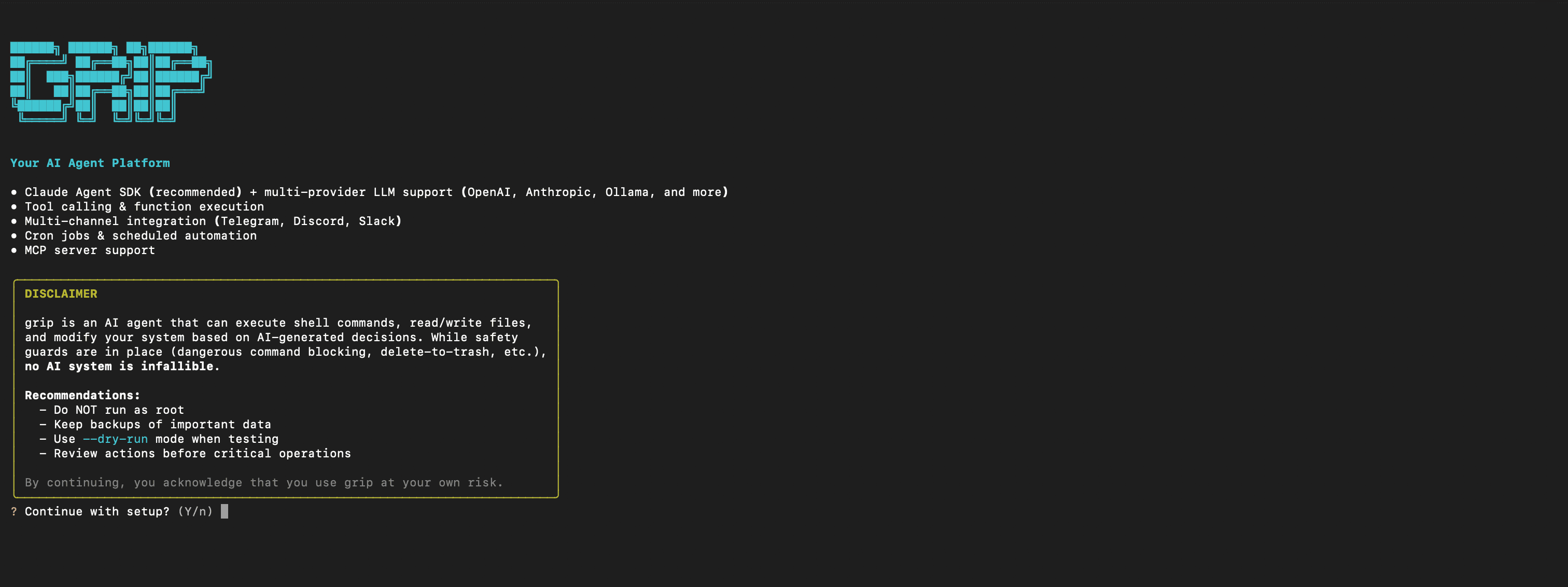
The wizard asks for the practical things:
- Which provider you want to use.
- Which API key is needed for that provider.
- Whether you want Telegram setup.
- Which workspace Grip should use.
- How file access should behave.
- Whether the SDK connection is working.
If you use Anthropic, create an API key from the Anthropic Console, paste it into the wizard, and continue.

If you want Telegram, create a bot with @BotFather, copy the token, and paste it into the wizard.

When setup is complete, you should see the config location, workspace path, and connection status.

How to use Grip AI
Short answer: use grip agent for terminal chat, grip gateway for the full platform, or grip serve for API-only mode.
Interactive terminal agent
grip agent
This opens a normal chat session in your terminal. You can ask questions, inspect files, request edits, run safe shell commands, or use slash commands.
One-shot mode
grip agent -m "Summarize the README.md in this directory"This is useful for quick automation. You send one prompt, Grip does the work, and the process exits.
Gateway mode
grip gatewayThis starts the fuller platform: API, configured chat channels, cron, heartbeat, and supporting services. If you want Grip running as a real local agent platform, this is the command you will use most.
API-only mode
grip serveThis is useful if you only want the REST API and plan to connect Grip to another interface yourself.
Example: stock data

In this example, I asked Grip for a stock price and it used the finance tool instead of guessing. That is exactly why tools matter. A normal model may hallucinate current data. A tool-enabled agent can fetch it.
For another simple developer-style project, I also wrote a separate guide on generating beautiful QR codes in Python. Different topic, same pattern: practical Python tooling that solves a real workflow problem.
Useful CLI commands
Here are the commands I would remember first:
| Command | What it does |
|---|---|
grip onboard | Start the setup wizard |
grip agent | Interactive terminal chat |
grip agent -m "prompt" | One-shot prompt |
grip gateway | Run the full platform |
grip serve | Run REST API only |
grip status | Show system status |
grip config show | Show current config |
grip config set KEY VALUE | Update config |
grip cron | Manage scheduled jobs |
grip skills | Manage markdown skills |
grip workflow | Run multi-agent workflows |
grip mcp | Manage MCP servers |
You do not need all of these immediately. Start with onboard, agent, and gateway. The rest becomes useful when you start building repeatable workflows.
Security notes before you run it
Short answer: Grip has safeguards, but you should still treat local AI agents seriously.
An AI agent with file and shell tools is not the same as a chatbot in a browser tab. It can interact with your machine. That is powerful, and it deserves caution.
Grip includes several safety layers:
- Directory trust model – Grip is restricted to its workspace by default, and external directory access requires explicit trust.
- Shell deny-list – shell commands are checked against 50+ dangerous command patterns.
- Credential scrubbing – secrets, API keys, tokens, and passwords are redacted from tool outputs and history.
- Bearer auth for API mode – the REST API is protected by token auth.
- Rate limits and audit logs – API requests can be rate-limited and logged.
- Security headers – the API includes standard hardening headers.
- Tool execute gated – arbitrary tool execution over HTTP is disabled by default.
- Startup warnings – dangerous config choices are surfaced when the app starts.
Still, my recommendation is simple: do not run Grip as root, do not trust your entire home folder on day one, keep backups of important data, and start with a test workspace.
The safest way to learn any agent platform is to give it a harmless sandbox first. Once you understand what it can do, then expand access carefully.
Who should use Grip AI?
Short answer: Python developers, automation builders, indie hackers, and technical users who want a self-hosted AI agent they can control.
Grip is a good fit if you:
- Prefer Python over TypeScript/Node.js for automation.
- Want to switch between multiple LLM providers.
- Need a local agent with file, shell, web, document, and API tools.
- Want Telegram, Discord, or Slack access to your own agent.
- Care about self-hosting and inspecting the code.
- Want to build internal tools around an agent API.
Grip is not the best fit if you want a completely non-technical consumer app, a hosted product with billing and support, or a one-click mobile assistant for family members.
I am fine saying that clearly. A tool becomes better when it knows who it is for.
Grip AI vs normal AI chat apps
Short answer: chat apps are easier, Grip gives you more control.
| Feature | Grip AI | Normal AI chat app |
|---|---|---|
| Runs on your machine | Yes | No, usually cloud hosted |
| Open source | Yes, MIT | Usually no |
| Multiple providers | Yes | Usually one provider ecosystem |
| File and shell tools | Yes, with safeguards | Limited or unavailable |
| REST API | Built in | Separate product/API |
| Chat channels | Telegram, Discord, Slack | Usually app-specific |
| Scheduled jobs | Yes | No |
| Setup effort | Higher | Lower |
| Best for | Developers and automation | General chatting and writing |
I still use normal AI apps. They are convenient. But when I want the AI to act inside a controlled workspace, use a provider I choose, expose an API, or become part of a repeatable workflow, I prefer Grip.
This is the same reason I like building small tools for boring jobs. For example, my Bulk Link Opener is not fancy. It just solves one annoying workflow. Grip is obviously much bigger, but the mindset is similar: reduce manual friction with a tool you can actually use.
What changed since launch?
Short answer: the project became more complete after the first release.
The initial public launch was exciting, but the current version is more useful than the first build. PyPI shows 1.0.0 was released on February 23, 2026, while the current latest release is 1.5.3 from March 24, 2026.
The main updates since the early article are:
- More tools: 31 now, not 26.
- More tests: 826 now, not 770.
- More code: about 24,000 lines now, not about 21,200.
- More API coverage: 28 endpoints now.
- Browser automation and document conversion are more central to the project.
- Security documentation is clearer.
I am not treating those numbers as a vanity metric. They simply show that this is not a weekend README-only project. There is real code, tests, packaging, releases, and documentation behind it.
Quick FAQ
Is Grip AI free?
Yes. Grip AI is open-source under the MIT license. You still pay your LLM provider for API usage unless you use a local model through something like Ollama or LM Studio.
What is the latest Grip AI version?
PyPI shows grip-ai 1.5.3 as the latest version, released on March 24, 2026.
Does Grip AI require Python?
Yes. Grip AI requires Python 3.12 or newer.
Can Grip AI run local models?
Yes. Grip supports local options such as Ollama Local, Llama.cpp, and LM Studio through the non-Claude engine path. Your hardware requirements depend on the local model you choose.
Is Grip AI safe?
Grip includes safety features like a directory trust model, shell deny-list, credential scrubbing, API auth, rate limiting, and startup warnings. But no local agent with tool access should be treated casually. Start in a test workspace and do not run it as root.
Can I use it from Telegram?
Yes. Grip supports Telegram, Discord, and Slack channels. Telegram is optional during setup, but it is one of my favorite ways to use the agent from a phone.
Where is the code?
The source code is on GitHub, and the installable package is on PyPI.
Summing Up!
Grip AI is the agent platform I wanted for myself: Python-native, self-hostable, open-source, multi-provider, tool-enabled, and practical enough to use from the terminal, API, or chat apps.
It is not meant to replace every AI app. It is meant for developers who want more control over how their AI agent runs, what tools it can use, where data lives, and which model provider powers the workflow.
Install it with uv tool install grip-ai or pip install grip-ai, run grip onboard, and start with a small test workspace. Once you understand the safety model and tools, you can connect Telegram, run the gateway, expose the API, or build your own workflows on top.
The project is open-source on GitHub. Star it, fork it, test it, break it, improve it, or just use it for your own automation. I would genuinely like to see what people build with it.